
Salon appointments on your Shopify store and at the till
A salon sells time by the chair. Booking Slot treats each stylist as a resource with their own hours, breaks and holidays, so a customer picking a 60-minute cut and finish only ever sees times that stylist is genuinely free. Walk-ins booked at the till share the same calendar, so the front desk can never take a slot the website already sold.
The problems this solves
- A client books online while a walk-in is being booked at the desk for the same chair
- Colour appointments need clean-down time that most apps do not model
- No-shows on Saturday mornings cost more than any app subscription
- The booking widget shows up on retail products where it makes no sense
How Booking Slot handles it
Pick a stylist or any available
Customers choose a named stylist or leave it open and the app assigns the first free one, respecting each person's hours.
Buffers per service
Give a full colour 15 minutes clean-down and a fringe trim none. Buffers block the chair without showing as bookable time.
Deposits for long appointments
Take a deposit on services over a threshold and collect the balance at the till. Reduces no-shows without putting off first-timers.
SMS reminders included
Reminders go out the day before with a link to reschedule, so a client who cannot make it frees the slot instead of vanishing.
Choose the salon preset during setup and these defaults are filled in for you.
Where salon bookings actually go wrong
Ask any salon owner what their booking system costs them and they will talk about the subscription. Ask what their booking mistakes cost them and the number is an order of magnitude bigger, because every one of them is a chair sitting empty on the busiest day of the week.
There are four failures that come up again and again. A client books online at the same moment the front desk books a walk-in, and both get half past two. A colour goes out with no clean-down time behind it, so the next client sits in reception while the station is cleared. A stylist books a week off, the holiday goes in the staff rota but not the booking app, and the website keeps selling her Thursdays. And on Saturday morning two clients simply do not arrive, which on a sixty pound cut and finish is a hundred and twenty pounds gone before the kettle has boiled.
None of these is a software problem in the sense of a bug. They are design decisions. Most booking apps check for conflicts after the sale rather than before it, treat buffers as a premium feature, and keep the till and the website in two different systems that reconcile every few minutes. Booking Slot was built after reading several hundred one-star reviews of the apps already on the Shopify App Store, and every one of these four failures was on the list.
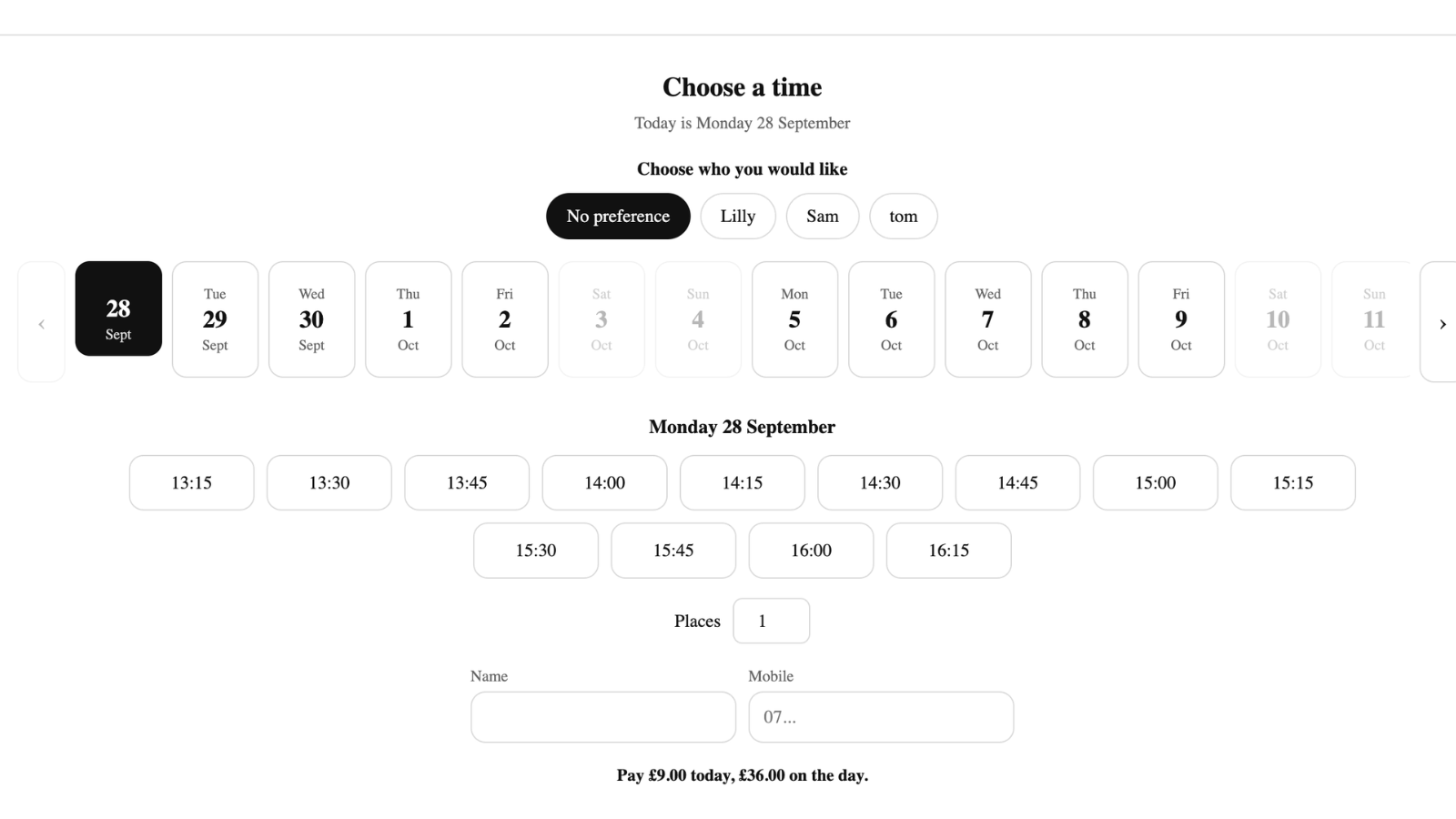
How a salon slot is worked out
When a client opens a cut and finish product page, the picker asks the server one question: which intervals on which stylists are genuinely free. The answer is calculated from scratch each time, not read from a cached timetable, and it takes four things into account.
First, the stylist's own weekly hours, including split shifts and alternate Saturdays. Second, her time off, whether that is a two-week holiday, a training day or a standing lunch break. Third, every booking already on her calendar, with its buffers included as blocked time. Fourth, any busy periods pulled from her own Google Calendar if she has connected it, so a dentist appointment in her personal diary quietly removes that hour from the website without anyone having to copy it across.
Only then are the remaining intervals offered. When the client picks one, the slot is held inside a database transaction for the length of the checkout. Two people clicking the same two o'clock at the same second cannot both succeed; one gets it, the other is told immediately and shown the next time. If the first client abandons the basket, the hold expires on its own and the slot returns to the list.
- Per-stylist hours, including split shifts and alternate weeks
- Holidays, training days and lunch blocked for that person only
- Buffers counted as blocked time, set per service
- Google Calendar busy times pulled in for stylists who connect theirs
- Transactional holds, so the same slot cannot be sold twice
Clean-down, colour and the services that need room
A fringe trim needs no recovery time. A full head of highlights needs the station cleared, the bowl rinsed and the trolley restocked, and if your app cannot express that difference you end up padding every service by fifteen minutes just to protect the few that need it. Over a six-day week that padding is several hours of chair time you have given away.
Buffers in Booking Slot are set per service, not per salon. A colour can carry fifteen minutes behind it while a blow dry carries none. The buffer blocks the stylist, so it never appears as a bookable time, but it is not charged to the client and does not show on their confirmation.
Services can also be any length rather than snapping to a half-hour grid. A forty-five minute cut followed by a twenty minute beard tidy is two real intervals back to back, with nothing wasted between them.
Deposits, and the arithmetic on no-shows
Work out your own number before deciding whether deposits are worth it. Count the appointments that did not turn up last month, multiply by your average service price, and compare that with fourteen pounds ninety-nine a month. For most salons the first no-show of the month has already paid for the year.
Booking Slot takes a deposit as a line in your normal Shopify checkout, so the money lands in your usual payout and appears in your usual reports. The deposit can be a fixed amount or a percentage of the service price, set per service, which means a twenty pound deposit on a three-hour colour and nothing at all on a fifteen minute fringe trim.
The balance is collected when the client arrives. Mark it paid at the till by cash, card or transfer, or send a Shopify payment link if they want to settle beforehand. Either way the booking stays tied to the original order, so there is no second system to reconcile at the end of the week.
Refunds remain yours. Booking Slot never holds the money and never applies a cancellation policy of its own. What it does enforce is the reschedule cutoff you set, so a client cannot move a Saturday appointment at nine o'clock on Saturday morning.
What it costs a salon, and what it will not do
A single-chair salon runs on the Free plan: one stylist, twenty bookings a month, and every scheduling rule switched on. Two chairs is fourteen pounds ninety-nine a month with unlimited bookings and fifty reminder texts. Three to eight chairs is thirty-nine ninety-nine, which is where booking at the till, group classes and Google Calendar arrive. Above eight, seventy-nine ninety-nine. Pay for a year and take twenty percent off. There is no percentage of your takings at any level.
Being straight about the gaps saves you an install. Booking Slot does not sell course packages or memberships, so a block of six blow dries is a Shopify product you sell and then book one at a time. It has no waitlist yet. It does not do recurring weekly appointments for your regulars, which is the single most requested thing on the roadmap. And it will not replace a salon management system that handles stock, commission and client treatment histories.
What it does do is make it impossible to sell the same chair twice, on any plan including the free one. If that is the thing costing you money, the rest can wait.
Questions about Shopify booking app for salons
Can each stylist have their own opening hours?
Yes, and this is the thing most booking apps get wrong by having one opening-hours setting for the whole salon. Every stylist has their own weekly hours, set per day, including split shifts and alternate-week patterns. Your colourist who starts at eleven on a Tuesday, your part-timer who does Thursday to Saturday, and the one who works every other Saturday are all handled on their own records. Add their holidays, training days and standing lunch breaks as time off, which blocks that person only. The picker then shows a client only the times their chosen stylist is genuinely free.
Does it work with Shopify POS on an iPad at reception?
Yes, on the Growth and Pro plans, and this is where the front desk stops clashing with the website. The POS booking screen calls the same availability and the same hold as the product page, in the same second, with no sync step in between. When your receptionist books a walk-in for half past two, the website cannot offer that slot, and the reverse is equally true. You can also put several bookings through one transaction, which covers a mum booking herself and two children. It works on POS Lite as well as POS Pro.
Can clients rebook with the same stylist easily?
Every confirmation and reminder carries a link to that booking, and from it a client can move or cancel themselves within your cutoff, keeping the same stylist. For a brand new appointment they book as normal, picking their stylist by name and seeing only that person's free times. What is not in the product yet is rebooking a series, so a client who wants the same slot every six weeks has to book each one. That is the single most requested thing on the roadmap for salons.
Will the picker appear on retail products like shampoo?
No. The picker renders only on the products you have explicitly linked to a service, so your retail lines stay completely untouched with nothing added to the page. That is deliberate: a date picker on a bottle of shampoo confuses customers and costs you sales. Link your cut and finish, your colour and your treatments; leave everything else exactly as it is. If you later add a new bookable service, you link that product and it appears there and nowhere else.
Try Booking Slot free on your store
Install in a few minutes, link one product and take a test booking. Free for one resource and 20 bookings a month, then flat pricing from £14.99.