
Take a deposit at booking and collect the balance later
A deposit is the difference between a client who shows up and one who forgets. Booking Slot takes the deposit through your normal Shopify checkout and gives you a one-click balance request or a till payment when the customer arrives.
The problems this solves
- Deposit apps that need their own payment provider
- Full payment upfront putting off first-time clients
- Balance tracked in a spreadsheet
- Refund policy arguments
How Booking Slot handles it
Deposit at checkout
The deposit is a Shopify line item, so it appears in your normal orders and reports.
Balance at the till or by link
Settle at POS or send a Shopify payment link for the remainder.
Deposit rules per service
A £20 deposit on a two-hour service and none on a 15-minute one.
Your refund policy
Refunds stay in Shopify under your policy. Booking Slot enforces the reschedule cutoff you set.
The arithmetic on no-shows
Before deciding whether to take deposits, work out what they would be protecting. Count the appointments that did not turn up last month and multiply by your average service price.
For a salon doing sixty-pound cuts, four no-shows is two hundred and forty pounds. For a clinic doing hour-long treatments at a hundred and twenty, two no-shows is the same. In both cases the monthly loss is more than a year of the app.
Deposits do not eliminate no-shows, but they change the psychology. Someone who has put twenty pounds down either turns up or rings to move it, and a call to move it is a slot you can resell.
A customer who has paid nothing has nothing to lose by forgetting. That is the entire mechanism.
How the deposit flows through Shopify
This is the part most deposit tools get awkward, because they bolt a second payment provider onto a shop that already has one.
Booking Slot does not. The deposit is a line in your normal Shopify checkout, taken through whatever payment methods you already offer, landing in your normal payout and appearing in your normal reports. There is no second dashboard, no second set of fees and no second reconciliation.
Technically it works through a Shopify Cart Transform function, which reprices the line at checkout based on the deposit rule you set on the service. The customer sees the full service price on the product page and the deposit amount at checkout, with the balance stated.
- Deposit taken through your existing Shopify payment setup
- Appears as a normal order in your normal reports
- Full price shown on the product, deposit charged at checkout
- No second payment provider, no second payout
Fixed amounts and percentages, per service
The rule is set on each service rather than across the shop, which matters because the services that need protecting are rarely all of them.
A fixed amount suits a shop with a clear threshold: twenty pounds on anything over an hour, nothing on a fifteen-minute fringe trim. A percentage suits a business with a wide price range, where thirty percent of a three-hundred-pound tattoo session and thirty percent of an eighty-pound one are both proportionate.
You can mix the two across your services. A tattoo studio might take a percentage on sessions and a fixed twenty on consultations.
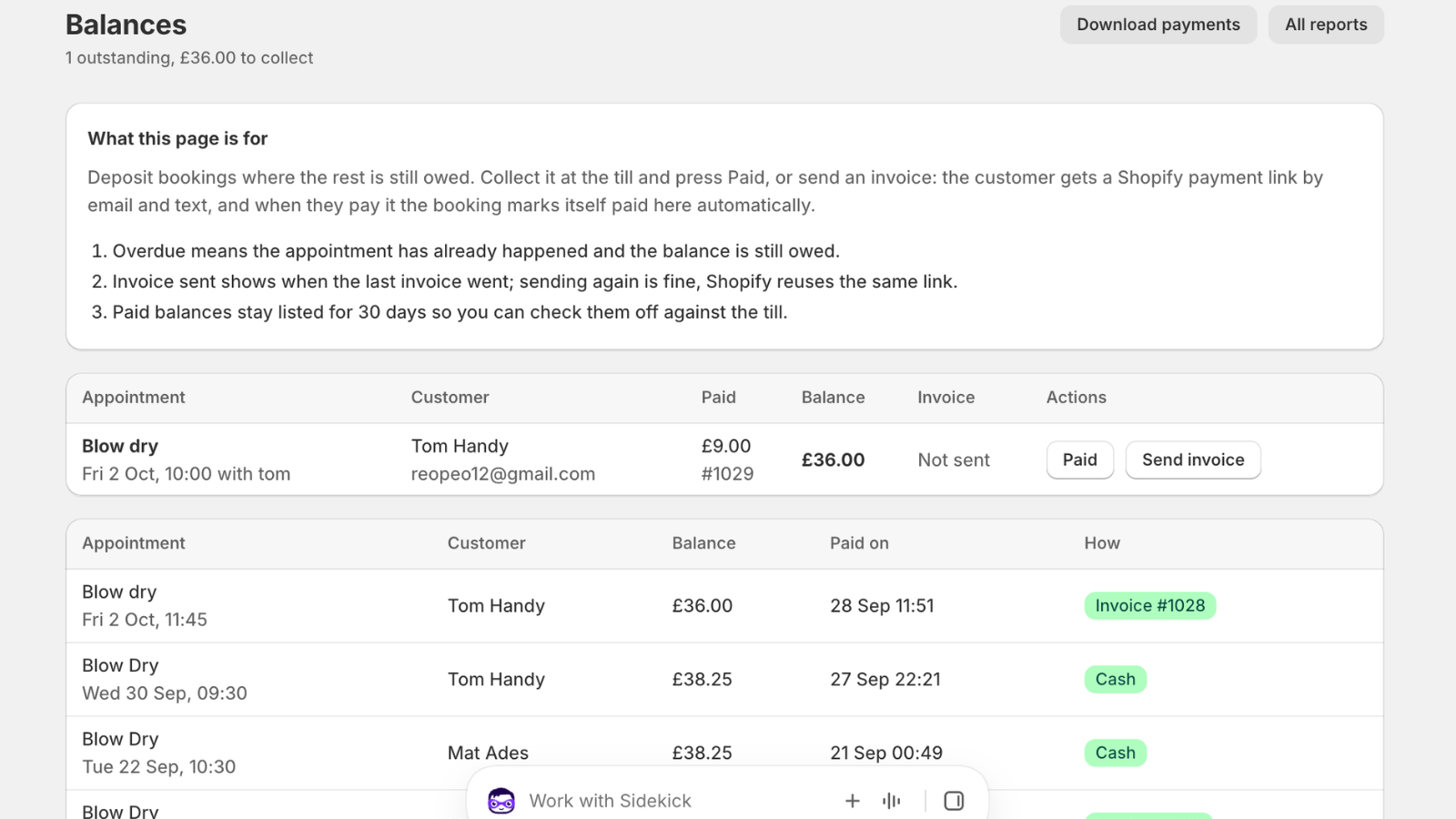
Collecting the balance
The balance is whatever is left after the deposit, and Booking Slot tracks it on the booking so you are not keeping a spreadsheet.
When the customer arrives, mark it paid at the till by cash, card or transfer, and the booking's record updates. If they would rather settle beforehand, send a Shopify payment link and they pay online; a Pay balance now button then appears on their booking page.
Either way the money is accounted against the original order, so your week's takings reconcile without manual work. Balance lines carry a flag that stops the deposit function repricing them, which is the sort of detail that only matters when it is wrong.
Refunds, policy and what Booking Slot does not do
Booking Slot never holds your money and never applies a cancellation policy of its own. Refunds happen in Shopify, under whatever policy you have written, and refunding an order releases the slot automatically.
What the app does enforce is the reschedule cutoff you set. A customer cannot move a Saturday morning appointment at nine o'clock on Saturday morning, which is the moment a cutoff earns its keep.
State your deposit policy on the product page. Non-refundable deposits are legal and normal in tattooing, aesthetics and long salon services, but only if the customer was told before they paid. That is your copy to write, not something software can do for you.
Deposits are on the Starter plan and above.
Questions about Shopify booking deposit
Which plans include deposits?
Starter at £14.99 a month and above, which for most salons, clinics and tattoo studios is the reason to move off the free plan in the first place. The free plan covers one resource and twenty bookings a month with every scheduling rule on, but deposits sit behind the first paid tier. Work out what deposits would protect before deciding: count last month's no-shows and multiply by your average service price. For most businesses that lose even a couple of long appointments a month, the first recovered booking pays for the year.
Can the deposit be a percentage rather than a fixed amount?
Either, and it is set per service rather than across the shop. A fixed amount suits a clear threshold, such as twenty pounds on anything over an hour and nothing on a fifteen-minute appointment. A percentage suits a wide price range: thirty percent of a three-hundred-pound tattoo session and thirty percent of an eighty-pound one are both proportionate without maintaining a table of thresholds. You can mix the two across your services, so a studio might take a percentage on sessions and a flat twenty on consultations.
What if the customer never pays the balance?
The booking stays confirmed against the deposit you took, so nothing is cancelled automatically. When the appointment passes, mark it completed, no-show or cancelled from the Calendar, and what happens to the deposit is governed by your own policy rather than by the app. Booking Slot never holds your money and never applies a cancellation policy of its own. If you operate non-refundable deposits, which are normal and legal in tattooing, aesthetics and long salon services, state that on the product page and in your terms before the customer pays, because that is what makes it enforceable.
Does the deposit go through my normal Shopify payout?
Yes. The deposit is a line in your normal Shopify checkout, taken through whatever payment methods you already offer, landing in your usual payout and appearing in your usual reports. There is no second payment provider, no second dashboard and no second set of fees. Technically it works through a Shopify Cart Transform function that reprices the line at checkout based on your deposit rule, so the customer sees the full service price on the product page and the deposit amount at checkout with the balance stated. Booking Slot never touches the money at any point.
Try Booking Slot free on your store
Install in a few minutes, link one product and take a test booking. Free for one resource and 20 bookings a month, then flat pricing from £14.99.