
How to sell services on Shopify, not just products
Shopify was built for goods, but a service is just a product with a time attached. Once you model it that way you get checkout, discounts, gift cards, customer accounts and reporting for free.
Step by step
Decide what you sell
Each service is a product: a 30-minute consultation, a 90-minute treatment, a class place.
Price it like a product
Use variants for durations or tiers, and Shopify discounts for offers.
Add booking
Install a booking app so the customer picks a time before adding to cart. Booking Slot links a service to the product.
Protect long appointments
Take a deposit and set a reschedule cutoff.
Automate reminders
SMS the day before with a reschedule link to cut no-shows.
Run it from one admin
Bookings appear as orders; the Calendar shows the diary; POS books walk-ins.
Why Shopify beats a dedicated booking platform for most service businesses
The conventional advice is that if you sell services you need a service platform. For a lot of small businesses that is backwards, and it costs them money.
A dedicated booking platform gives you a calendar and takes a payment. What it usually does not give you is a shop. If you also sell product, and most service businesses do, you end up running two systems, two payment providers, two sets of customer records and two sets of books. The reconciliation at month end is the hidden cost nobody quotes you.
Selling services through Shopify means the haircut and the shampoo are in the same basket, the same order, the same payout and the same report. You get discount codes, gift cards, abandoned cart recovery and customer accounts for free, because they are Shopify features and a service is just a product with a time attached.
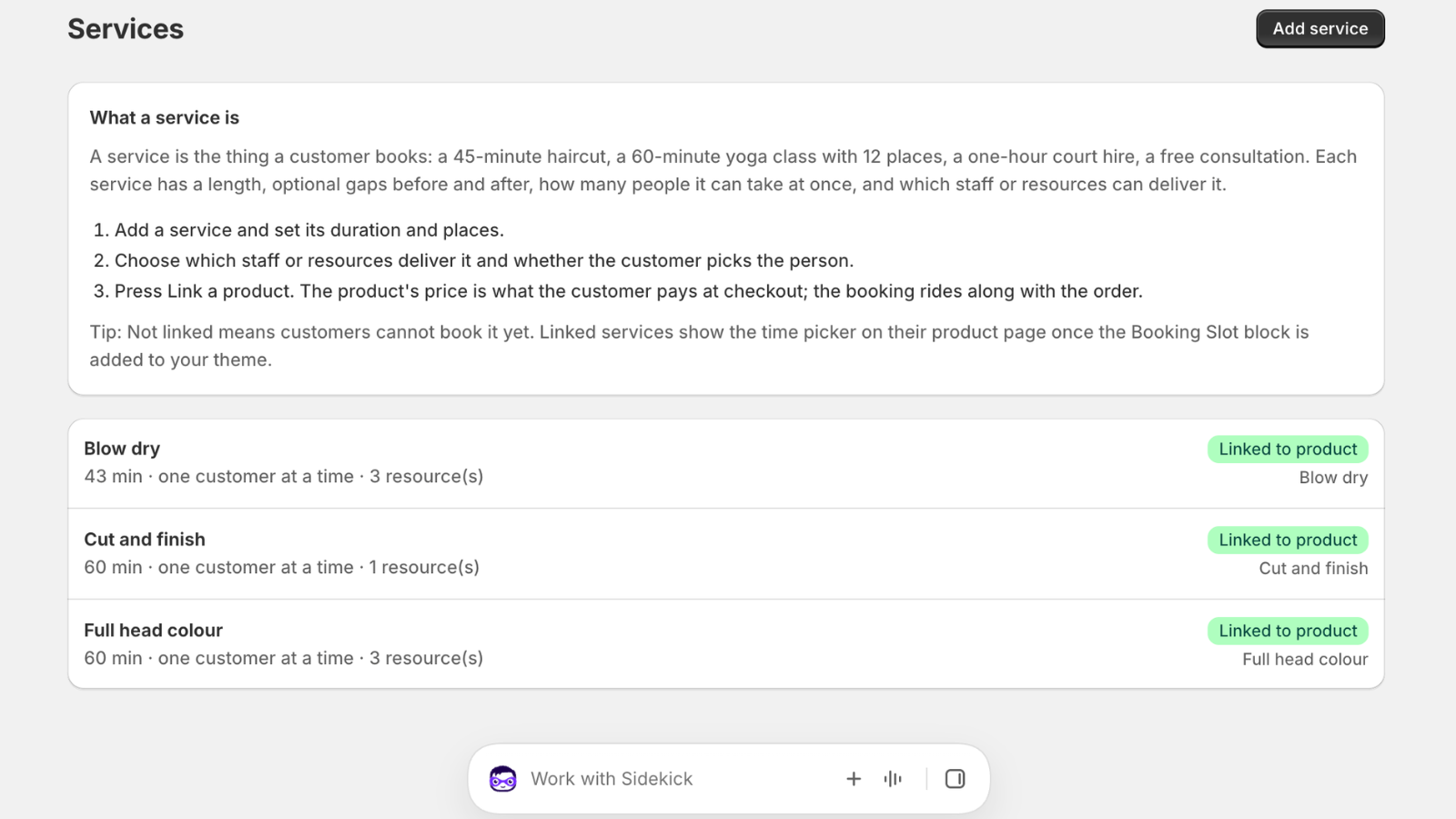
Pricing a service like a product
Variants are the tool most people miss. A sixty and a ninety minute massage are one product with two variants, not two products, which means one page to maintain and one place for reviews to accumulate.
Shopify discounts work on services exactly as they do on goods, so a new customer code or a quiet Tuesday promotion needs no special handling. Customer tags plus automatic discounts give you member pricing without a membership system.
Gift cards are the one that surprises people. A Shopify gift card can be spent at checkout on a booked service, which means you can sell vouchers at Christmas with no extra tooling at all.
- Variants for durations and tiers
- Shopify discounts and automatic discounts work unchanged
- Gift cards redeemable against bookings
- Customer tags for member or returning-client pricing
Tax, which is where service businesses get caught
Services are taxed differently from goods in some jurisdictions and identically in others, and Shopify will not work this out for you. Set the tax treatment on each service product deliberately rather than letting it inherit whatever your physical products use.
In the UK most services carry standard-rate VAT if you are registered, and the price your customer sees should include it. If you are below the threshold and not registered, set the products to no tax and make sure your invoices do not imply otherwise.
This is worth twenty minutes with your accountant before you take the first booking rather than a correction across six months of orders afterwards.
Running the business from one admin
Once services are products, your day looks like this. Bookings arrive as orders, so they are in the same list as everything else you sold. The booking app's Calendar is your diary: today's list, who is in, what time, with which member of staff. The till books walk-ins against the same calendar.
Deposits, reminders and self-service rescheduling all hang off that one record. A customer who cannot make Thursday taps the link in their reminder and moves themselves, and the slot frees up while there is still time to sell it.
What you do not get, and should not expect, is a practice management system. Clinical notes, stock control, staff commission and payroll are separate problems. Shopify plus a booking app covers selling and scheduling, which for most small service businesses is the part that was actually broken.
Questions about how to sell services on Shopify
Can customers buy products and services in the same basket?
Yes, and this is the main reason to sell services through Shopify rather than a separate platform. A client books Thursday's treatment and adds a bottle of shampoo, and it is one basket, one checkout, one order, one payout and one confirmation email. Everything downstream works the same way: discount codes apply across both, abandoned cart recovery sees the whole basket, and your reports show the real value of a customer rather than splitting it across two systems you have to reconcile by hand.
Do I need a separate website for the booking side?
No, and running one is usually a mistake. The booking picker lives on your existing Shopify product pages, so customers never leave your store and you have one site to maintain, one place for SEO to accumulate and one set of analytics. A separate booking site splits your traffic, your reviews and your reporting, and gives you a second thing to keep up to date. If you do not have a Shopify store yet, Shopify Basic plus a booking app is cheaper than most standalone booking platforms.
Can customers use gift cards or vouchers against a booking?
Yes. A Shopify gift card can be spent at checkout on a booked service exactly as it can on a physical product, because the booking is a normal line in a normal order. That means you can sell vouchers at Christmas with no extra tooling, no separate voucher system and no manual redemption process. It is the single feature that most surprises people moving from a dedicated booking platform, where gift vouchers are usually a paid add-on or not supported at all.
How does VAT work on services sold through Shopify?
Set the tax treatment deliberately on each service product rather than letting it inherit whatever your physical products use, because services are taxed differently from goods in some jurisdictions. In the UK, most services carry standard-rate VAT if you are registered, and the price the customer sees should include it. If you are under the threshold and not registered, set the products to no tax and make sure your invoices do not imply otherwise. This is worth twenty minutes with your accountant before the first booking rather than a correction across six months of orders afterwards.
Try Booking Slot free on your store
Install in a few minutes, link one product and take a test booking. Free for one resource and 20 bookings a month, then flat pricing from £14.99.